
Oracle Multicloud Journey – Part 3: CPAT
Hi everyone, hope you’re doing well.
Welcome back to another post of this series documenting the Oracle Multicloud Journey.
If you’ve been following from the beginning, you already know that this project involved migrating a production Oracle RAC environment running on IBM AIX to Oracle Autonomous Database Serverless@Azure.
Here you can check the previous posts:
Oracle Multicloud Journey – Part 1: The Architecture Decision
At that point, the architecture was defined. The migration tools had been selected.
But, before performing any production migration, there is one question that should always be answered first:
Is the source database actually ready to be migrated?
That is exactly why Oracle provides one of the most valuable utilities available for cloud migrations: the Cloud Premigration Advisor Tool, or CPAT.
Why You Should Never Skip CPAT
After more than twenty years working with Oracle databases, one lesson keeps repeating itself in almost every migration project I’ve worked on:
Migrations rarely fail because of the migration tool itself.
Data Pump works. RMAN works. GoldenGate works. ZDM works. CTAS works, well, you got the idea… When problems happen, they usually come from characteristics of the source environment that nobody realized would matter during the migration.
Maybe an initialization parameter works differently on the target platform. Maybe an application still depends on a DIRECTORY object that was created ten years ago and nobody remembers. Maybe a deprecated feature is still enabled. Maybe there is a database link pointing somewhere that nobody uses (or remember about that) anymore.
Those are not migration problems. Those are environment problems. The migration just exposes them.
Rather than asking “Can I migrate this database?”, I prefer asking “What characteristics of this database could affect the migration?” That is exactly the question CPAT was designed to answer.
CPAT should not be the last validation before the migration. It should be one of the first technical activities performed after the architecture has been defined, maybe the very first one. The earlier you find potential issues, the easier they should are to fix.
What CPAT Actually Does
CPAT is a Java-based, read-only command-line tool that connects to a source database and runs a series of checks against the data dictionary. It evaluates initialization parameters, inspects metadata, and compares everything against Oracle’s recommendations for the selected target platform and migration method.
A few important points:
- It is 100% read-only. No new users, no new roles, no packages, no temporary tables. Nothing is written to the database.
- It is transparent. For most checks, CPAT includes the SQL statement that produced the finding. You can reproduce the result yourself
- It supports multiple targets and migration methods. Autonomous Database Serverless, Autonomous Database Dedicated, Base Database Service, Exadata Database Service, Data Pump, GoldenGate, and more.
Some of the areas CPAT evaluates:
- Initialization parameters
- Database compatibility
- Tablespaces
- DIRECTORY objects
- Database links
- BasicFile LOBs
- XML DB components
- Java objects and sources
- Scheduler jobs
- External tables
- Privileges and roles
- Character set compatibility
- GoldenGate compatibility
- Unsupported object types
CPAT currently runs more than 80 individual checks. Only the subset applicable to the selected Target Cloud Type and Migration Method will appear in your report.
Running CPAT and Why I Used ALL Options
Before I was involved in this project, the customer had already run CPAT using a properties file for their initial migration scenario. Since I was responsible for defining the migration strategy, I asked them to generate a broader assessment after talking to Alex Zaballa. He is the PM for CPAT and told me that I should run considering ALL options.
Instead of evaluating a single target and migration method, I asked for a report covering everything. This is the command that was executed:
premigration.sh --connectstring jdbc:oracle:oci:@ \
--sysdba --gatherdetails ALL \
--targetcloud ALL --migrationmethod ALL \
--pdbname=PDBNAME
Replace PDBNAME with the name of PDB you are planning to migrate.
Three parameters in particular deserve attention here:
- –targetcloud ALL: evaluates against every supported Oracle Cloud target type simultaneously: ATPS, ATPD, ADWS, ADWD, and DEFAULT.
- –migrationmethod ALL: includes findings specific to all migration methods: Data Pump, GoldenGate, and DATAPUMP_DBLINK.
- –gatherdetails ALL: collects extended information beyond the standard checks. As of CPAT 26.5.0, this includes a STATISTICS option that gathers optimizer statistics extensions, table-level preferences, global statistics preferences, and tables with a parallel degree setting, all relevant when migrating to Autonomous Database. Our execution used CPAT 25.9.0, since this assessment was done in October 2025.
This produces a significantly larger report.
CPAT is available on My Oracle Support via Doc ID KB139585. It does not require installation and runs on any machine with Java 8 or higher that has network access to the source database. You can also run it directly through SQLcl using the MIGRATEADVISOR command.
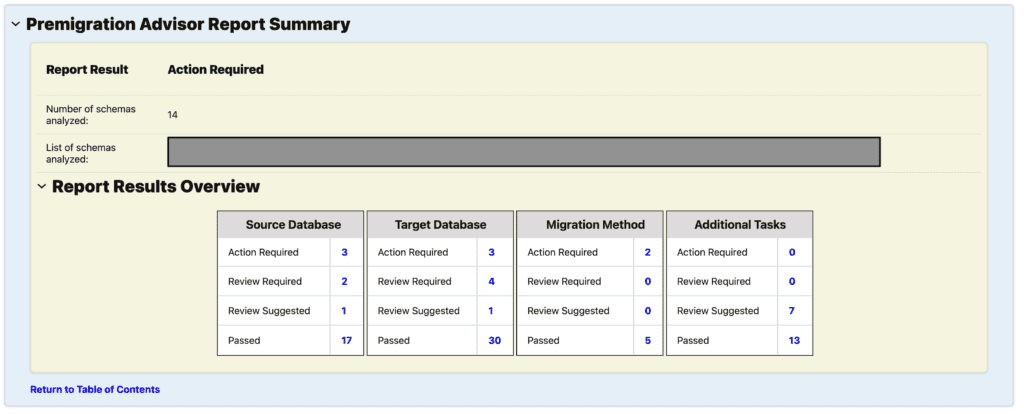
CPAT 25.9.0 report summary: 88 checks, 8 Action Required, 6 Review Required, 9 Review Suggested, 65 Passed. 14 schemas analyzed.
Report Details and Filtering
The report has built-in filters for Target Cloud Type and Migration Method. Instead of reading everything, you can deselect the targets and methods that don’t apply to your project and the report will update accordingly. In our case, we kept ATPS for the target and DATAPUMP + GOLDENGATE for the migration method. That alone cuts out a significant portion of findings that are simply not relevant to our scenario.
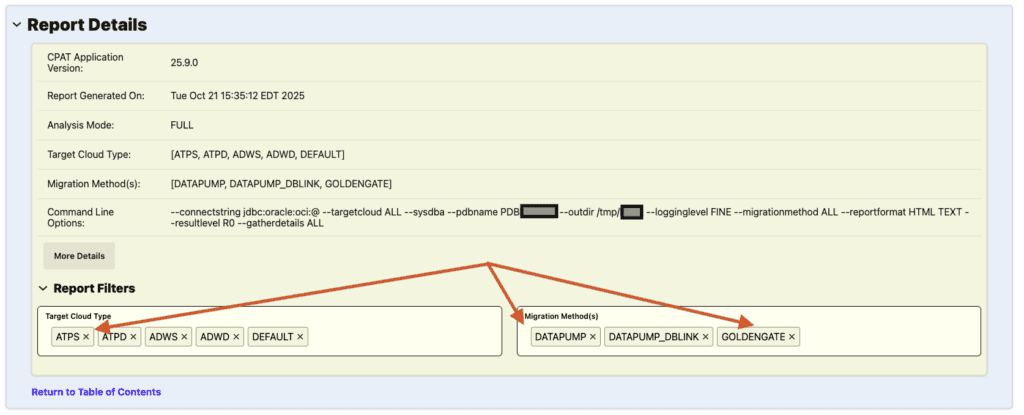
Report Filters section, showing Target Cloud Type and Migration Method filters. We removed ATPD, ADWS, ADWD, and DEFAULT from the target, and DATAPUMP_DBLINK from the migration method, keeping only what applied to our environment.
Understanding the Structure of a CPAT Finding
Every validation in the report follows exactly the same structure, which makes even very large reports easy to navigate.
Each finding may include:
- Target Cloud Type: which Oracle Cloud target this finding applies to.
- Migration Method: which migration tooling this finding applies to.
- Result: the outcome of the check.
- Description: what Oracle inspected and why.
- Failure Impact: what happens if you ignore this finding.
- Action: guidance on remediation when applicable.
- Relevant Objects: exactly which database objects triggered the finding.
- Executed SQL: the query CPAT executed to reach this conclusion. You can run it yourself and validate the result independently.
Understanding the Result Categories
Once CPAT finishes its assessment, every validation receives one of five result classifications. This is where it might have the most confusion, because people tend to read these as a simple severity scale: red is bad, green is good, fix everything in between.
That interpretation is wrong. The result categories indicate Oracle’s expectation of how a finding may affect the migration, they do not rank severity for the finding.
The results are listed from most serious to least serious:
| Result | Description |
|---|---|
| Action Required | The Cloud Premigration Advisor analysis discovered something that would likely cause the migration to be unsuccessful. Checks with this result typically need to be resolved before attempting migration. |
| Review Required | The Cloud Premigration Advisor analysis indicates migration may succeed (at least in part) but not everything is expected to work exactly like before or some work post migration must be done to bring the target instance into alignment with the source database. |
| Review Suggested | The Cloud Premigration Advisor analysis indicates migration should succeed and applications will likely see no functional difference but database administrators should evaluate each Check with this status to look for any unforeseen consequences. |
| Passed | The Cloud Premigration Advisor analysis indicates migration should succeed and applications should see no difference in behavior. |
| Failed | The Cloud Premigration Advisor was unable to complete its analysis. Please contact Oracle Support Services. |
One important note: Action Required does not necessarily mean that Data Pump import (for example) would terminate prematurely. It means there will likely be errors during import that indicate not all data has been migrated. An administrator familiar with both the database and the applications must examine any finding that is not Passing.
Additional Tasks
CPAT also produces an Additional Tasks section. Which are important to be reviewed also. Do not ignore any section of the report.
The Additional Tasks section groups checks that are not about migration blockers, they document characteristics of the source database that have post-migration impact or behavioral differences on the target. These checks typically come back as Passed or Informational, not Action Required or Review Required.
In our report, the checks that landed here included things like: Index-Organized Tables (which ADB automatically converts to heap tables), tables and partitions using NOLOGGING, BasicFile LOBs, ILM ADO policies that won’t migrate, traditional auditing configuration, Active Data Guard detection, and modified initialization parameters.
None of those should be blockers. But each one was worth understanding, because the behavior of those features on Autonomous Database is different from what it was on-premises, and the application teams needed to know about it.
Target Cloud Type and Migration Method
I consider this the most important part of the report, because here you can choose what will be the target clout type, in our case, ATPS (Autonomous Serverless), and what will be the migration method, in our case, Data Pump and Golden Gate..
Because we ran CPAT with –targetcloud ALL and –migrationmethod ALL, the report covers findings for:
- Target Cloud Types: ATPS (Autonomous Serverless), ATPD (Autonomous Dedicated), ADWS (Data Warehouse Serverless), ADWD (Data Warehouse Dedicated), and DEFAULT
- Migration Methods: Data Pump, GoldenGate, DATAPUMP_DBLINK
This means the report intentionally contains findings that are mutually exclusive. A recommendation written for Autonomous Dedicated can have nothing to do with Autonomous Serverless. CPAT is not telling you that every finding applies to your project, it is documenting every scenario that matches the selected options.
Once you understand that, the report became much easier to read. Instead of asking “How many Action Required findings do we have?”, you will started asking:
“Which of these findings actually apply to Autonomous Serverless, ZDM, and GoldenGate?”
That single change in perspective dramatically reduced the number of findings that actually needed investigation.
The two examples below illustrate exactly this point. Both are Action Required. But they are not equal.
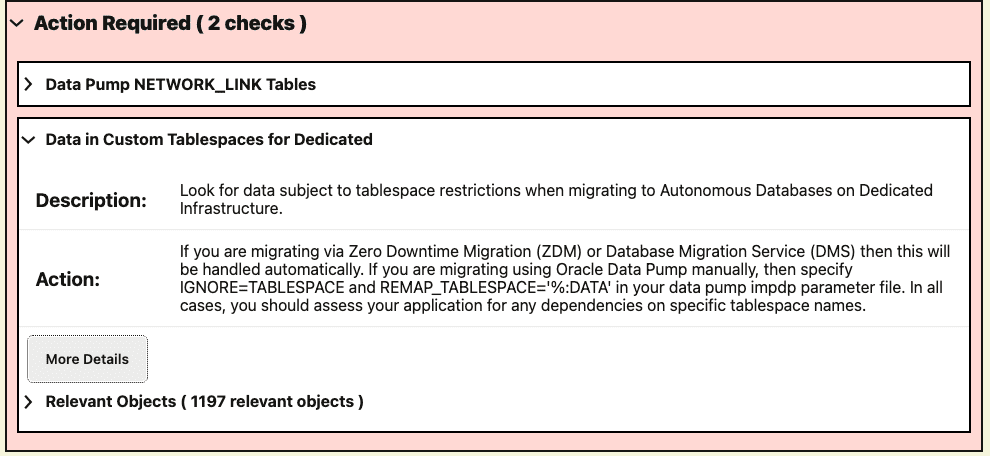
Action Required finding scoped to ATPD/ADWD only (Dedicated). Our strategy targets ATPS (Serverless),so, this finding does not apply to our migration.
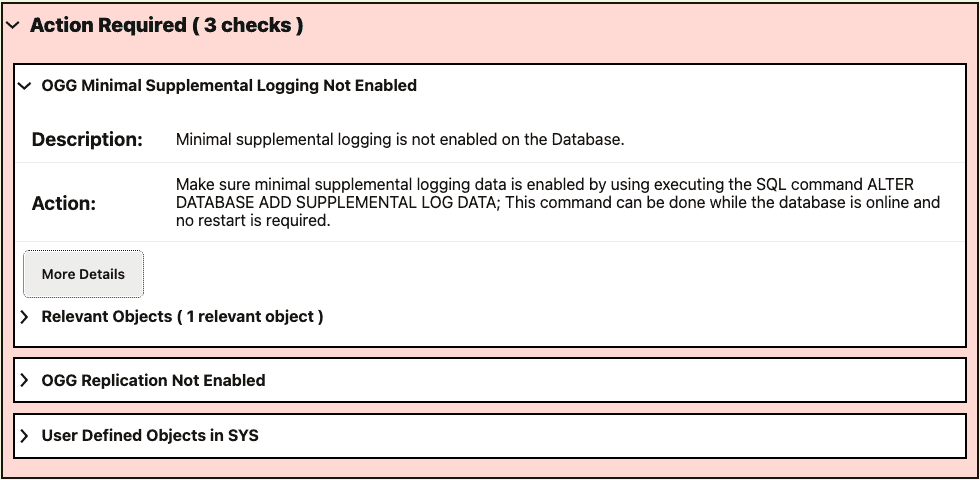
Action Required for gg_supplemental_log_data_min, applicable to ALL cloud types with GoldenGate. This required action: supplemental logging had to be enabled on the source before starting replication.
Not All Action Required Findings Are Blockers
If there is one thing I want you to take away from this post, it is this:
Do not count Action Required findings and use that number to determine how ready your database is.
Remember, CPAT is an assessment tool, not a grading tool. Don’t focus and get the number of Action Required to zero. Understand each of them and see if they apply or not to your scenario.
Think about it this way: two projects using the exact same source database. One migrates to Autonomous Dedicated using Data Pump. The other migrates to Autonomous Serverless using Data Pump + GoldenGate. Should they receive the same recommendations?
Of course not.
That is why CPAT records the Target Cloud Type and Migration Method for each check. An experienced review is not about eliminating findings, it is about deciding which ones are actually relevant for your project.
How I Reviewed This Report
Since I knew from the start that the target was Autonomous Database Serverless and that the migration strategy was Data Pump + GoldenGate, I filtered the report based on that. No point spending time on findings that don’t apply to the environment.
Action Required — Source Database
The first two findings made complete sense for our setup:
- OGG Minimal Supplemental Logging Not Enabled: required for GoldenGate. Fix is straightforward: ALTER DATABASE ADD SUPPLEMENTAL LOG DATA. Online, no restart.
- OGG Replication Not Enabled: ENABLE_GOLDENGATE_REPLICATION was not set. Fix: ALTER SYSTEM SET ENABLE_GOLDENGATE_REPLICATION=TRUE SCOPE=BOTH. Also online, no restart.
The other also was not a concern:
- User Defined Objects in SYS: two objects flagged: AUDIT_LAST_ARCHIVE_TIME (JOB) and JAVA$POLICY$SHARED$CANARY (JAVA RESOURCE). Both are default database objects, not application objects. Nothing to migrate here.
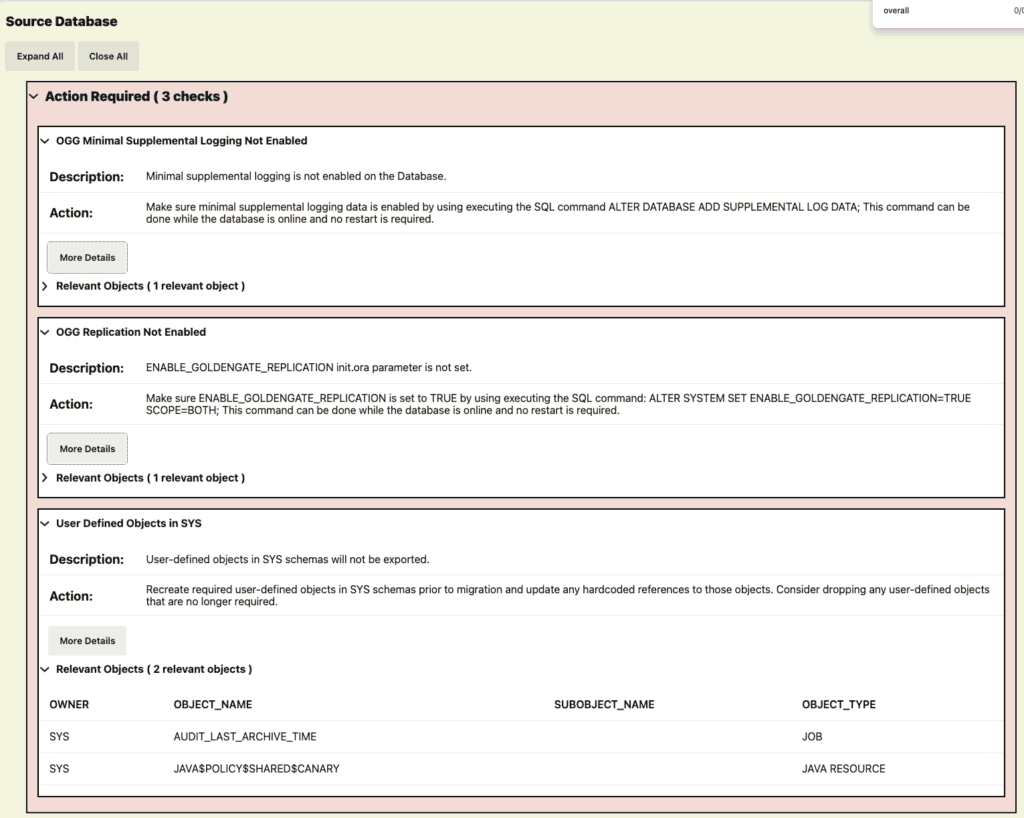
Action Required findings for the Source Database. The first two are real items to address before migration. The third one, User Defined Objects in SYS, flagged two default database objects that have nothing to do with the application and can be ignored.
This is a good example of why “Action Required” doesn’t automatically mean “blocker.” The context matters.
Action Required — Target Database (ATPS)
Two findings here, and none of them were blockers for our scenario:
- Common Objects: C##TRIPWIRE_AGENT was flagged. This is a common user from the source CDB, not something that needs to exist on Autonomous.
- Role Privileges: 16 roles flagged for DBAADMIN, most of them are either not supported or not needed on Autonomous Database Serverless. Nothing actionable here for our migration.
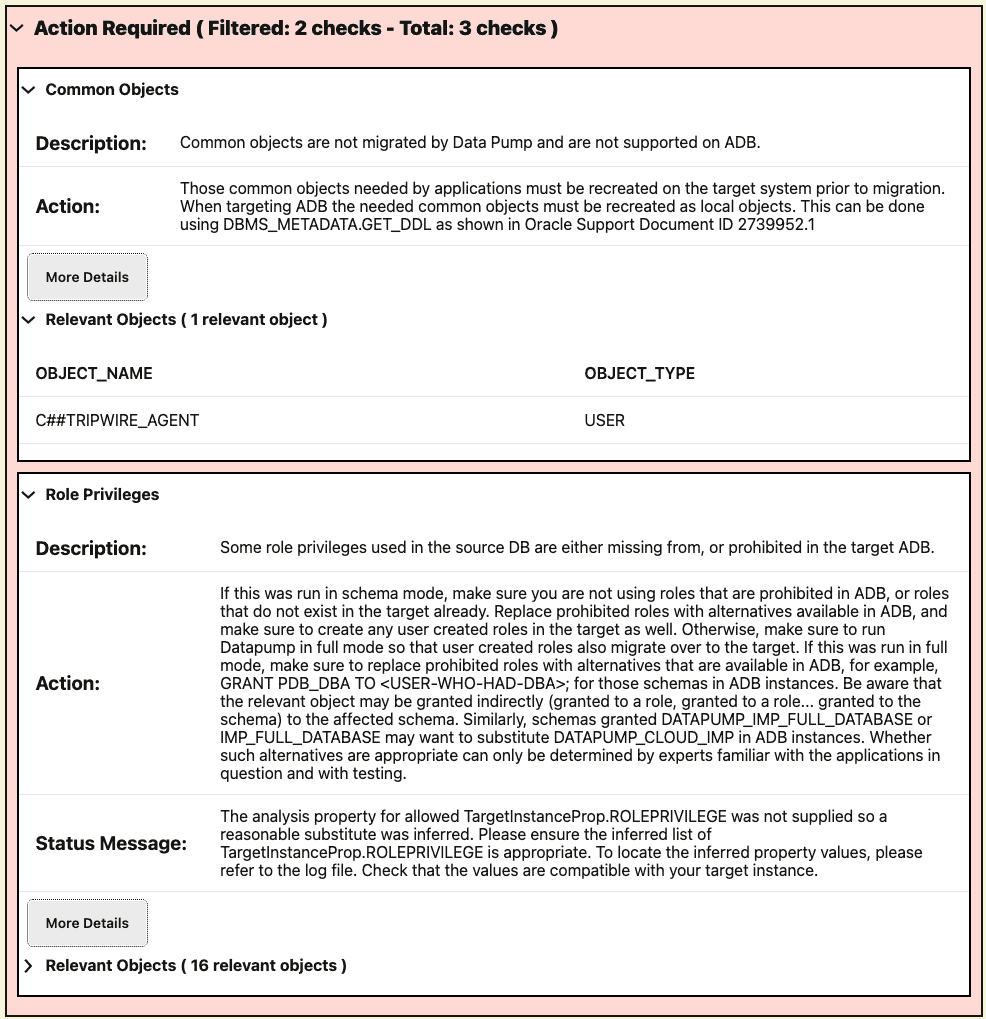
Action Required findings for the Target Database (ATPS), filtered to 2 checks. Common Objects flagged
C##TRIPWIRE_AGENT, a common user from the source CDB that does not need to exist on Autonomous. Role Privileges flagged 16 roles for DBAADMIN, none of them actionable for our migration.
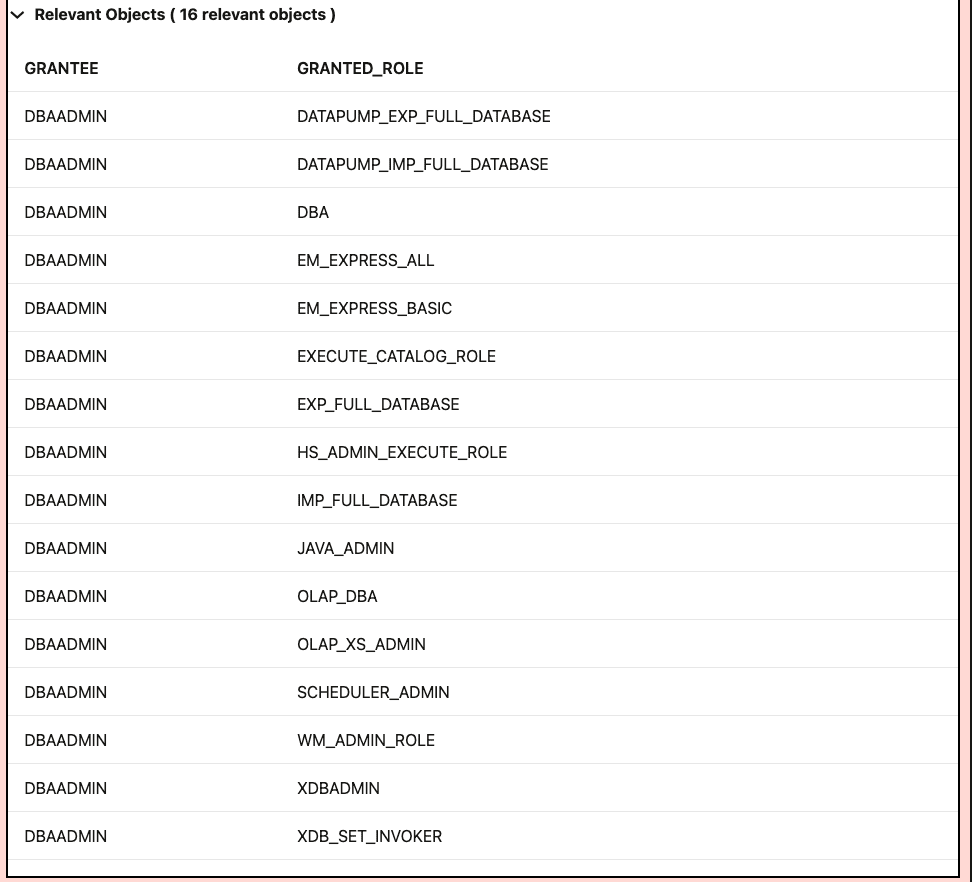
The 16 roles flagged under Role Privileges for
DBAADMIN. Most of these are either not supported or simply not needed on Autonomous Database Serverless.
How CPAT Influenced Our Migration Strategy
Some findings in the report were for migration scenarios we had already ruled out. Those we simply ignored.
The findings related to Autonomous Serverless, Data Pump, and GoldenGate were the ones that actually mattered. Those drove our planning.
By the end of the assessment, we had a full inventory of the source environment, a clear list of what needed to be addressed before migration (as you could see, just small things), and confirmation that our strategy was compatible with Autonomous Serverless.
Further Reading — Alex Zaballa’s CPAT Series
If you want to go deeper on CPAT, I strongly recommend the blog series by Alex Zaballa, Oracle Product Manager and one of the main people behind CPAT. His series is the reference I go to whenever I need to verify something about CPAT.
- FAQ — alexzaballa.com/cpat-frequently-asked-questions/
- Part 1 — Starting with CPAT: what it is, how it works, supported database versions
- Part 2 — Options for Running CPAT: command-line parameters, parameter files, ZDM integration
- Part 3 — Running CPAT: practical examples and connection strings
- Part 4 — Troubleshooting CPAT: privilege issues, JDBC connectivity, edge cases
- Part 5 — CPAT Checks: detailed coverage of individual checks, results, and fixup scripts
- Part 6 – CPAT New Features – December 2024
- Part 7 — CPAT Composer: graphical tool for building CPAT commands without the command line (my inspiration for Autoupgrade Composer)
- Part 8 – CPAT New Features – June 2025
- Part 9 – CPAT – How to Use a Parameter File
- Part 10 – CPAT New Features – September 2025
- Part 11 – CPAT New Features – December 2025
- Part 12 – CPAT New Features – January 2026
- Part 13 – Using CPAT for Non-Autonomous Migrations
- Part 14 – CPAT New Features – May 2026 — CPAT 26.5.0 introduces a new ATTS migration method and a new STATISTICS option for
--gatherdetails. This option surfaces optimizer statistics extensions, table-level preferences, global preferences, and tables with a parallel degree setting, all relevant when migrating to Autonomous DB.
What’s Next
Stay tuned, I will continue on this blog series. In the next posts, we will finally describe the installation/configuration for ZDM, OGG, Autonomous@Azure, etc.
Hope it helps!
Peace,
Vinicius
Leave a comment